

IDM integration guide for Firefox
Q. I've just updated Firefox to its newest
version and IDM integration into Firefox stopped working. IDM does not
take over downloads from Firefox anymore. What can I do to fix it?
Q. Firefox said it had disabled the IDM extension because it wasn't compatible. How do I resolve the problem?
Q. I cannot integrate IDM into FireFox 23, FireFox 22 (FireFox 21, FireFox 20, FireFox 19, FireFox 18, FireFox 17, FireFox 16, FireFox 15, FireFox 14, FireFox 13, FireFox 12, FireFox 11, FireFox 10, FireFox 9, FireFox 8, FireFox 7, FireFox 6, FireFox 5, FireFox 4, FireFox 3). What should I do?

1. Please make sure that you have installed the latest version of IDM by using Help->Quick Update menu item.
Please use "Help->Quick Update" IDM main menu item to get the latest version of IDM.
2. Don't forget to turn on the corresponding checkbox for browsers that you use in IDM Options -> General tab.
3. It's possible that you need to update IDM extension for Firefox. Pick "Tools->Add-ons" menu item in Firefox
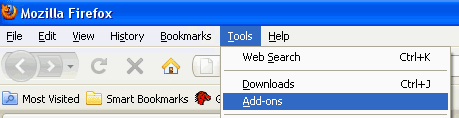
Add-ons dialog should open. Click on "Extensions" tab and find IDM CC (Internet Download Manager integration module for Mozilla):
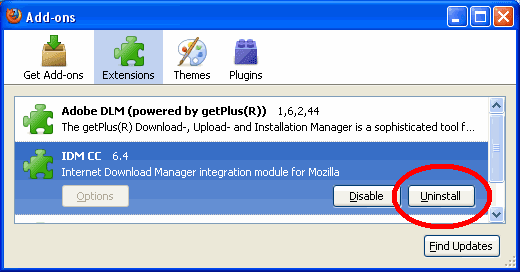
3.a. If "Uninstall" button is available (like on the picture above), press this button and confirm deinstallation. Then close and restart Firefox browser. On next start, Firefox will find and install the latest version of IDM CC extension automatically using system registry. That's all.
(www.internetdownloadmanager.com)
Add-ons dialog should open. Click on "Extensions" tab and find IDM CC (Internet Download Manager integration module for Mozilla):
3.a. If "Uninstall" button is available (like on the picture above), press this button and confirm deinstallation. Then close and restart Firefox browser. On next start, Firefox will find and install the latest version of IDM CC extension automatically using system registry. That's all.
(www.internetdownloadmanager.com)


I can't read anything while this windows keep annoying me
ReplyDeleteAdd-On Idm Cc Lastest Version 7.3.69 For Firefox ~ Software >>>>> Download Now
Delete>>>>> Download Full
Add-On Idm Cc Lastest Version 7.3.69 For Firefox ~ Software >>>>> Download LINK
>>>>> Download Now
Add-On Idm Cc Lastest Version 7.3.69 For Firefox ~ Software >>>>> Download Full
>>>>> Download LINK 5C
nais share bro
ReplyDeletehttp://www.kaskus2003.com
thnx for it....I found more softwars on http://offlineinstallersdownload.com
ReplyDeleteedeeeeeeeeeeeeeeeeeeeeeee
ReplyDeleteAdd-On Idm Cc Lastest Version 7.3.69 For Firefox ~ Software >>>>> Download Now
ReplyDelete>>>>> Download Full
Add-On Idm Cc Lastest Version 7.3.69 For Firefox ~ Software >>>>> Download LINK
>>>>> Download Now
Add-On Idm Cc Lastest Version 7.3.69 For Firefox ~ Software >>>>> Download Full
>>>>> Download LINK 1r
Having a dedicated integration guide specifically for Firefox is incredibly helpful! Mozilla frequently updates its strict add-on security policies, which often results in the IDM download panel suddenly disappearing from video players or the add-on getting disabled completely. While manually dragging the idmmzcc.xpi file into the Firefox add-ons manager is a great quick fix, many users find that the extension simply breaks all over again during the next background update. This usually happens because the underlying registry files and software foundation aren't perfectly synced with the browser. To ensure your IDM extension stays permanently enabled in Firefox and flawlessly catches every single download link without throwing annoying permission errors, getting that foundational setup completely clean is critical. Following an ultimate 14-step IDM configuration manual guarantees a rock-solid, error-free installation on Windows 10 and 11. Thanks for focusing on Firefox users with this excellent and much-needed tutorial!
ReplyDelete